Release Note V1.33.0: The Counter Rebuild
Editorial
February 19, 2026



The New Counter
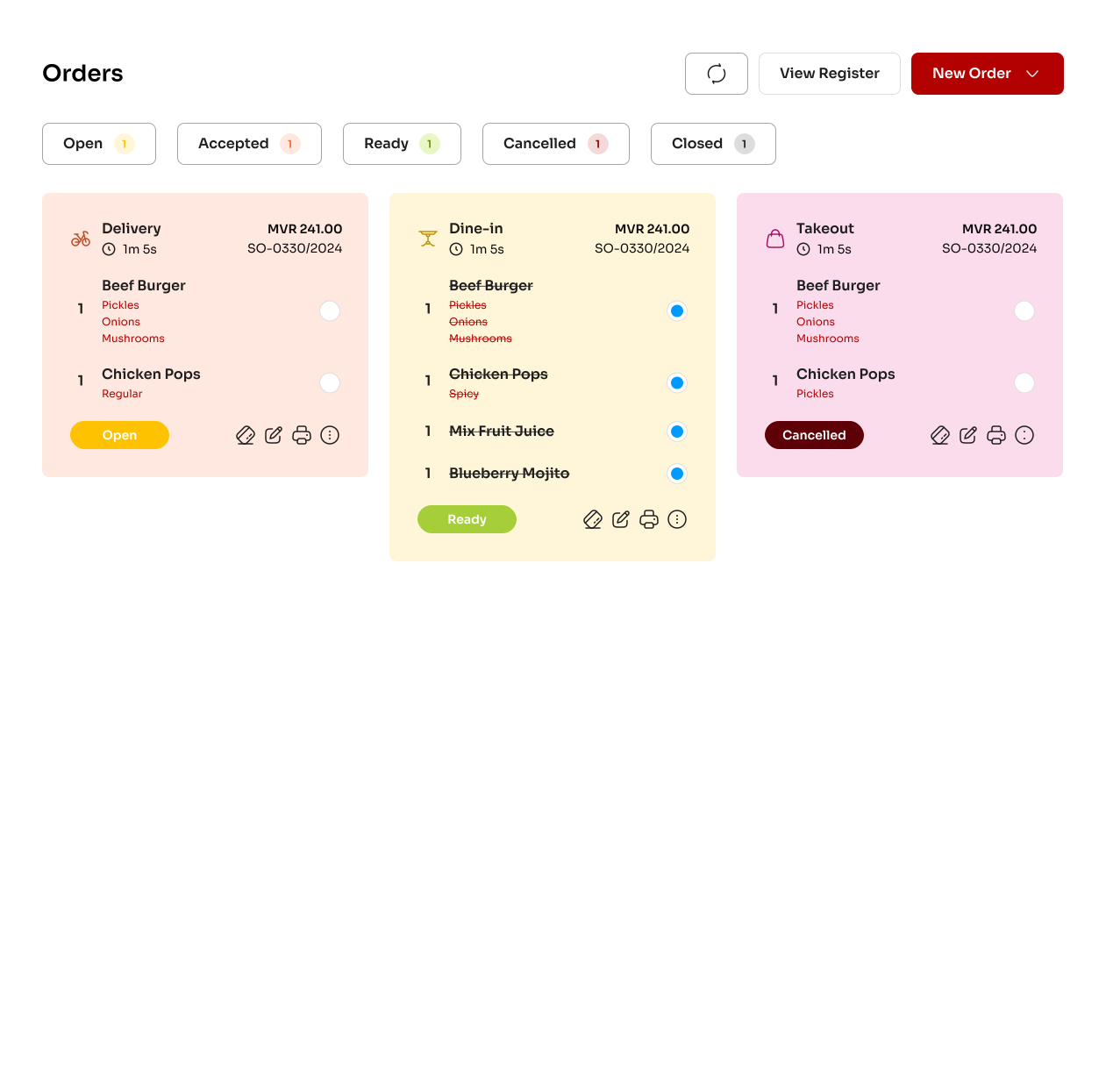
The Counter has been completely rewritten. Everything from the layout to the order-taking logic has been redesigned for speed and reliability.
Redesigned interface — Cleaner layout, better use of screen space, and a ticket system built around status tabs (New, Preparing, Ready) so staff can track orders at a glance.
Mark Ready — A dedicated button on counter tickets lets front-of-house flag orders as ready, bridging the gap between kitchen and counter without shouting across the room. Additionally this flag will be a key workflow driver in the upcoming waiter and delivery app release.
Real-time sync — Order status changes, closed tabs, and cancelled orders now reflect instantly across multiple devices and all connected sessions.
Faster order taking — Resolved the bug where clicking items too fast created duplicates. Item selection, modifier toggling, and variant handling are all more responsive.
Variant improvements — Fixed the issue where editing a variant name overwrote the parent name. Variants are now searchable and display their product image on the counter.
Allergy & notes — Allergy info and preparation notes now correctly appear on KOT tickets and receipts. Previously, toggling allergies on didn't actually surface the text.
Cancelled items — Cancelled items no longer appear on KOT tickets, order receipts, or the KDS. Cancelled Items will be printed as a separate Cancelled KOT.
Toast notifications — Replaced the intrusive full-screen blocking toasts with compact, non-blocking toastr notifications. Added a toast alert when new orders come in from the ordering app.
New Features
Meal Subscriptions — A full subscription module for managing recurring meal plans and long-term customer commitments.
Dual-Classification Items — Items can now be classified as both Ingredients and Sold Items, giving flexibility to businesses that sell raw goods alongside prepared food.
Import Wizard — A template-based system for bulk-uploading products, variants, and customers. Supports image uploads via URL, automatic category and ingredient creation for items that don't exist yet, spreadsheet instructions, bulk update highlighting, and variant item imports. Integration-tested.
Stock Transfer Requests — A structured workflow for requesting and fulfilling stock transfers between locations.
Payments & Financial Integrity
Database transactions on all payments — Every payment function now runs inside a database transaction. This was a full data integrity audit of the financial transaction pipeline.
Invoice integrity — Invoices and payment journals are now posted before the register session closes. Duplicate invoices on sales orders are surfaced and can be voided.
Auto-print receipts — Receipts can print automatically the moment payment is completed.
Opening balance adjustments — Opening balances on pending close registers can now be adjusted for tighter cash control.
Payment editing — Payments can now be edited without having to delete the previous entry first.
Inventory & Purchasing
Shopping list — Items can be added without a pre-set reorder level.
Warehouse visibility — Fixed the Purchase Receive workflow so stock hits the correct location.
Sell without inventory — Now enabled by default for new items.
Tax labels on POs — Purchase Orders now clearly show Inclusive/Exclusive tax at the line item level.
Unit conversions — New conversion factor UI, a standard unit conversion library, receiving unit auto-convert, missing conversion prompts, and an enhanced custom unit conversion modal.
BOM deduction — Fixed Bill of Materials deduction on order preparation.
Stock deduction — Fixed the issue where stock wasn't being deducted when a sale was made.
Ingredient filtering — Recipe dropdowns now properly filter by ingredients.
Purchasing enhancements — Price variance alerts on receiving, quality/damage tracking on receive, shopping list bulk actions, PO auto-grouping by supplier, and price trend indicators.
Kitchen low stock alert — Kitchen staff now get alerted when items are running low.
Printing
Printer connection — Resolved the recurring "losing connection" errors with thermal printers.
Address cutoff — Fixed delivery addresses being cut off on thermal receipts.
Allergy cutoff — Fixed allergy text getting truncated in auto-print.
Modifier spacing — Fixed excessive spacing after modifier display in auto-printed receipts.
Logo size — Increased logo size on receipts for better branding.
Other Fixes
Customer statements — Fixed customer statement display issues.
Credit notes — Customer history now reflects credit note creation.
Walk-in customers — Prevented assigning addresses to walk-in customers and selecting walk-ins for delivery orders.
Auto-refresh — Fixed missing auto-refresh when cancelling orders in table view.
Outlet filtering — Fixed issue where only outlet-assigned products showed in POS. Category filtering now works correctly.
Delivery rider selection — Resolved rider assignment issues for delivery orders.
Locked tickets — Fixed the inability to unlock tickets.
Dashboard — Optimized the dashboard API for faster loading.
Image uploads — Product images now upload to Cloudflare Images. Fixed various image upload issues and default image selection.
Shops module — Thermal receipt support, permissions and roles, sales search with 2-digit SKUs, credit-based invoice template fix, and import feature fixes.
Reports — Sales details report Excel export now sorts correctly.
Traders — Fixed logo display in quote/invoice templates for trader outlets.
PDF templates — Item details can now be edited from the PDF template editor.
Modifier pricing — Modifier prices now use price-with-tax for better accuracy.
The New Counter
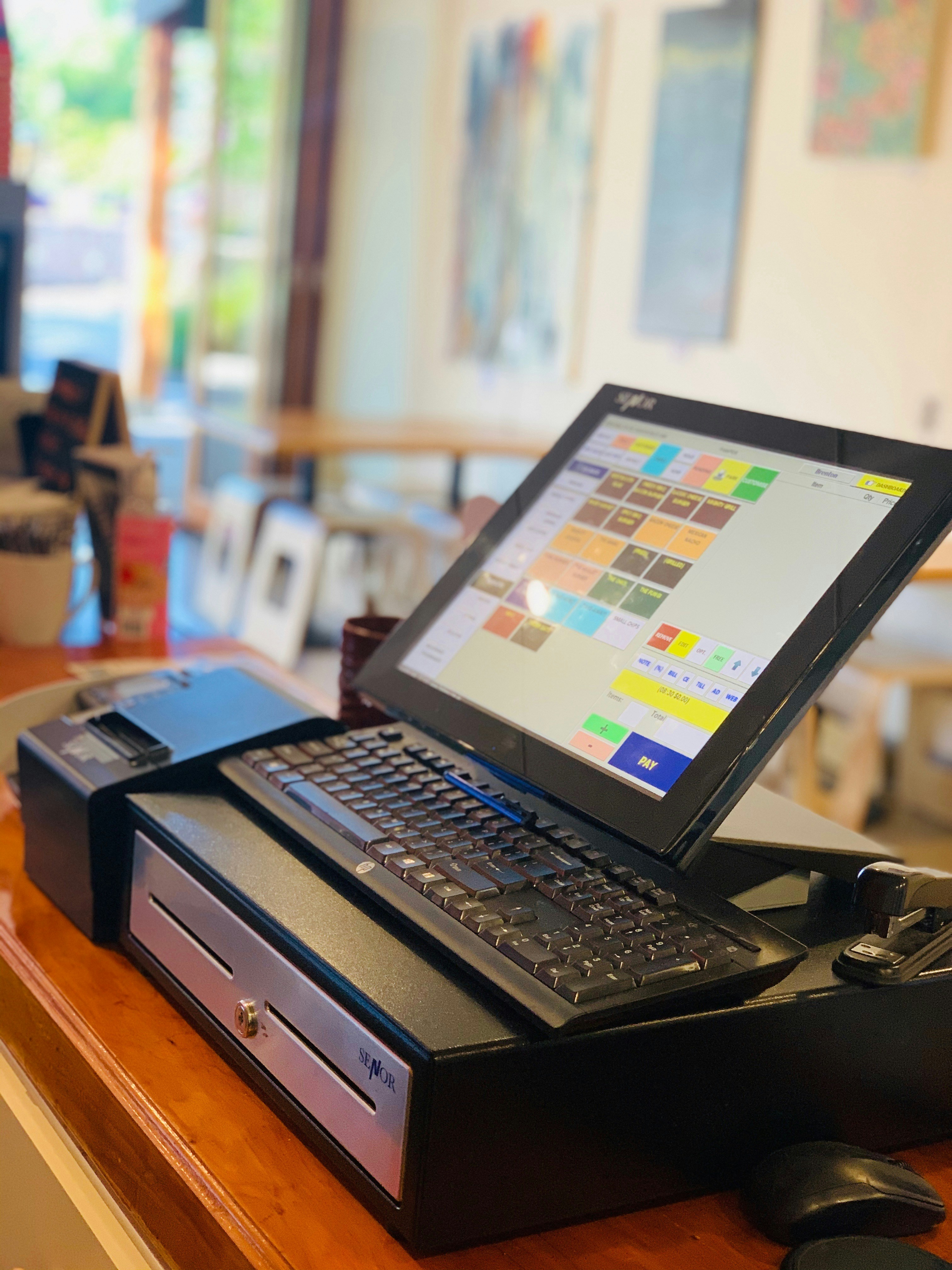
The Counter has been completely rewritten. Everything from the layout to the order-taking logic has been redesigned for speed and reliability.
Redesigned interface — Cleaner layout, better use of screen space, and a ticket system built around status tabs (New, Preparing, Ready) so staff can track orders at a glance.
Mark Ready — A dedicated button on counter tickets lets front-of-house flag orders as ready, bridging the gap between kitchen and counter without shouting across the room. Additionally this flag will be a key workflow driver in the upcoming waiter and delivery app release.
Real-time sync — Order status changes, closed tabs, and cancelled orders now reflect instantly across multiple devices and all connected sessions.
Faster order taking — Resolved the bug where clicking items too fast created duplicates. Item selection, modifier toggling, and variant handling are all more responsive.
Variant improvements — Fixed the issue where editing a variant name overwrote the parent name. Variants are now searchable and display their product image on the counter.
Allergy & notes — Allergy info and preparation notes now correctly appear on KOT tickets and receipts. Previously, toggling allergies on didn't actually surface the text.
Cancelled items — Cancelled items no longer appear on KOT tickets, order receipts, or the KDS. Cancelled Items will be printed as a separate Cancelled KOT.
Toast notifications — Replaced the intrusive full-screen blocking toasts with compact, non-blocking toastr notifications. Added a toast alert when new orders come in from the ordering app.
New Features
Meal Subscriptions — A full subscription module for managing recurring meal plans and long-term customer commitments.
Dual-Classification Items — Items can now be classified as both Ingredients and Sold Items, giving flexibility to businesses that sell raw goods alongside prepared food.
Import Wizard — A template-based system for bulk-uploading products, variants, and customers. Supports image uploads via URL, automatic category and ingredient creation for items that don't exist yet, spreadsheet instructions, bulk update highlighting, and variant item imports. Integration-tested.
Stock Transfer Requests — A structured workflow for requesting and fulfilling stock transfers between locations.
Payments & Financial Integrity
Database transactions on all payments — Every payment function now runs inside a database transaction. This was a full data integrity audit of the financial transaction pipeline.
Invoice integrity — Invoices and payment journals are now posted before the register session closes. Duplicate invoices on sales orders are surfaced and can be voided.
Auto-print receipts — Receipts can print automatically the moment payment is completed.
Opening balance adjustments — Opening balances on pending close registers can now be adjusted for tighter cash control.
Payment editing — Payments can now be edited without having to delete the previous entry first.
Inventory & Purchasing
Shopping list — Items can be added without a pre-set reorder level.
Warehouse visibility — Fixed the Purchase Receive workflow so stock hits the correct location.
Sell without inventory — Now enabled by default for new items.
Tax labels on POs — Purchase Orders now clearly show Inclusive/Exclusive tax at the line item level.
Unit conversions — New conversion factor UI, a standard unit conversion library, receiving unit auto-convert, missing conversion prompts, and an enhanced custom unit conversion modal.
BOM deduction — Fixed Bill of Materials deduction on order preparation.
Stock deduction — Fixed the issue where stock wasn't being deducted when a sale was made.
Ingredient filtering — Recipe dropdowns now properly filter by ingredients.
Purchasing enhancements — Price variance alerts on receiving, quality/damage tracking on receive, shopping list bulk actions, PO auto-grouping by supplier, and price trend indicators.
Kitchen low stock alert — Kitchen staff now get alerted when items are running low.
Printing
Printer connection — Resolved the recurring "losing connection" errors with thermal printers.
Address cutoff — Fixed delivery addresses being cut off on thermal receipts.
Allergy cutoff — Fixed allergy text getting truncated in auto-print.
Modifier spacing — Fixed excessive spacing after modifier display in auto-printed receipts.
Logo size — Increased logo size on receipts for better branding.
Other Fixes
Customer statements — Fixed customer statement display issues.
Credit notes — Customer history now reflects credit note creation.
Walk-in customers — Prevented assigning addresses to walk-in customers and selecting walk-ins for delivery orders.
Auto-refresh — Fixed missing auto-refresh when cancelling orders in table view.
Outlet filtering — Fixed issue where only outlet-assigned products showed in POS. Category filtering now works correctly.
Delivery rider selection — Resolved rider assignment issues for delivery orders.
Locked tickets — Fixed the inability to unlock tickets.
Dashboard — Optimized the dashboard API for faster loading.
Image uploads — Product images now upload to Cloudflare Images. Fixed various image upload issues and default image selection.
Shops module — Thermal receipt support, permissions and roles, sales search with 2-digit SKUs, credit-based invoice template fix, and import feature fixes.
Reports — Sales details report Excel export now sorts correctly.
Traders — Fixed logo display in quote/invoice templates for trader outlets.
PDF templates — Item details can now be edited from the PDF template editor.
Modifier pricing — Modifier prices now use price-with-tax for better accuracy.
The New Counter
The Counter has been completely rewritten. Everything from the layout to the order-taking logic has been redesigned for speed and reliability.
Redesigned interface — Cleaner layout, better use of screen space, and a ticket system built around status tabs (New, Preparing, Ready) so staff can track orders at a glance.
Mark Ready — A dedicated button on counter tickets lets front-of-house flag orders as ready, bridging the gap between kitchen and counter without shouting across the room. Additionally this flag will be a key workflow driver in the upcoming waiter and delivery app release.
Real-time sync — Order status changes, closed tabs, and cancelled orders now reflect instantly across multiple devices and all connected sessions.
Faster order taking — Resolved the bug where clicking items too fast created duplicates. Item selection, modifier toggling, and variant handling are all more responsive.
Variant improvements — Fixed the issue where editing a variant name overwrote the parent name. Variants are now searchable and display their product image on the counter.
Allergy & notes — Allergy info and preparation notes now correctly appear on KOT tickets and receipts. Previously, toggling allergies on didn't actually surface the text.
Cancelled items — Cancelled items no longer appear on KOT tickets, order receipts, or the KDS. Cancelled Items will be printed as a separate Cancelled KOT.
Toast notifications — Replaced the intrusive full-screen blocking toasts with compact, non-blocking toastr notifications. Added a toast alert when new orders come in from the ordering app.
New Features
Meal Subscriptions — A full subscription module for managing recurring meal plans and long-term customer commitments.
Dual-Classification Items — Items can now be classified as both Ingredients and Sold Items, giving flexibility to businesses that sell raw goods alongside prepared food.
Import Wizard — A template-based system for bulk-uploading products, variants, and customers. Supports image uploads via URL, automatic category and ingredient creation for items that don't exist yet, spreadsheet instructions, bulk update highlighting, and variant item imports. Integration-tested.
Stock Transfer Requests — A structured workflow for requesting and fulfilling stock transfers between locations.
Payments & Financial Integrity
Database transactions on all payments — Every payment function now runs inside a database transaction. This was a full data integrity audit of the financial transaction pipeline.
Invoice integrity — Invoices and payment journals are now posted before the register session closes. Duplicate invoices on sales orders are surfaced and can be voided.
Auto-print receipts — Receipts can print automatically the moment payment is completed.
Opening balance adjustments — Opening balances on pending close registers can now be adjusted for tighter cash control.
Payment editing — Payments can now be edited without having to delete the previous entry first.
Inventory & Purchasing
Shopping list — Items can be added without a pre-set reorder level.
Warehouse visibility — Fixed the Purchase Receive workflow so stock hits the correct location.
Sell without inventory — Now enabled by default for new items.
Tax labels on POs — Purchase Orders now clearly show Inclusive/Exclusive tax at the line item level.
Unit conversions — New conversion factor UI, a standard unit conversion library, receiving unit auto-convert, missing conversion prompts, and an enhanced custom unit conversion modal.
BOM deduction — Fixed Bill of Materials deduction on order preparation.
Stock deduction — Fixed the issue where stock wasn't being deducted when a sale was made.
Ingredient filtering — Recipe dropdowns now properly filter by ingredients.
Purchasing enhancements — Price variance alerts on receiving, quality/damage tracking on receive, shopping list bulk actions, PO auto-grouping by supplier, and price trend indicators.
Kitchen low stock alert — Kitchen staff now get alerted when items are running low.
Printing
Printer connection — Resolved the recurring "losing connection" errors with thermal printers.
Address cutoff — Fixed delivery addresses being cut off on thermal receipts.
Allergy cutoff — Fixed allergy text getting truncated in auto-print.
Modifier spacing — Fixed excessive spacing after modifier display in auto-printed receipts.
Logo size — Increased logo size on receipts for better branding.
Other Fixes
Customer statements — Fixed customer statement display issues.
Credit notes — Customer history now reflects credit note creation.
Walk-in customers — Prevented assigning addresses to walk-in customers and selecting walk-ins for delivery orders.
Auto-refresh — Fixed missing auto-refresh when cancelling orders in table view.
Outlet filtering — Fixed issue where only outlet-assigned products showed in POS. Category filtering now works correctly.
Delivery rider selection — Resolved rider assignment issues for delivery orders.
Locked tickets — Fixed the inability to unlock tickets.
Dashboard — Optimized the dashboard API for faster loading.
Image uploads — Product images now upload to Cloudflare Images. Fixed various image upload issues and default image selection.
Shops module — Thermal receipt support, permissions and roles, sales search with 2-digit SKUs, credit-based invoice template fix, and import feature fixes.
Reports — Sales details report Excel export now sorts correctly.
Traders — Fixed logo display in quote/invoice templates for trader outlets.
PDF templates — Item details can now be edited from the PDF template editor.
Modifier pricing — Modifier prices now use price-with-tax for better accuracy.
The New Counter
The Counter has been completely rewritten. Everything from the layout to the order-taking logic has been redesigned for speed and reliability.
Redesigned interface — Cleaner layout, better use of screen space, and a ticket system built around status tabs (New, Preparing, Ready) so staff can track orders at a glance.
Mark Ready — A dedicated button on counter tickets lets front-of-house flag orders as ready, bridging the gap between kitchen and counter without shouting across the room. Additionally this flag will be a key workflow driver in the upcoming waiter and delivery app release.
Real-time sync — Order status changes, closed tabs, and cancelled orders now reflect instantly across multiple devices and all connected sessions.
Faster order taking — Resolved the bug where clicking items too fast created duplicates. Item selection, modifier toggling, and variant handling are all more responsive.
Variant improvements — Fixed the issue where editing a variant name overwrote the parent name. Variants are now searchable and display their product image on the counter.
Allergy & notes — Allergy info and preparation notes now correctly appear on KOT tickets and receipts. Previously, toggling allergies on didn't actually surface the text.
Cancelled items — Cancelled items no longer appear on KOT tickets, order receipts, or the KDS. Cancelled Items will be printed as a separate Cancelled KOT.
Toast notifications — Replaced the intrusive full-screen blocking toasts with compact, non-blocking toastr notifications. Added a toast alert when new orders come in from the ordering app.
New Features
Meal Subscriptions — A full subscription module for managing recurring meal plans and long-term customer commitments.
Dual-Classification Items — Items can now be classified as both Ingredients and Sold Items, giving flexibility to businesses that sell raw goods alongside prepared food.
Import Wizard — A template-based system for bulk-uploading products, variants, and customers. Supports image uploads via URL, automatic category and ingredient creation for items that don't exist yet, spreadsheet instructions, bulk update highlighting, and variant item imports. Integration-tested.
Stock Transfer Requests — A structured workflow for requesting and fulfilling stock transfers between locations.
Payments & Financial Integrity
Database transactions on all payments — Every payment function now runs inside a database transaction. This was a full data integrity audit of the financial transaction pipeline.
Invoice integrity — Invoices and payment journals are now posted before the register session closes. Duplicate invoices on sales orders are surfaced and can be voided.
Auto-print receipts — Receipts can print automatically the moment payment is completed.
Opening balance adjustments — Opening balances on pending close registers can now be adjusted for tighter cash control.
Payment editing — Payments can now be edited without having to delete the previous entry first.
Inventory & Purchasing
Shopping list — Items can be added without a pre-set reorder level.
Warehouse visibility — Fixed the Purchase Receive workflow so stock hits the correct location.
Sell without inventory — Now enabled by default for new items.
Tax labels on POs — Purchase Orders now clearly show Inclusive/Exclusive tax at the line item level.
Unit conversions — New conversion factor UI, a standard unit conversion library, receiving unit auto-convert, missing conversion prompts, and an enhanced custom unit conversion modal.
BOM deduction — Fixed Bill of Materials deduction on order preparation.
Stock deduction — Fixed the issue where stock wasn't being deducted when a sale was made.
Ingredient filtering — Recipe dropdowns now properly filter by ingredients.
Purchasing enhancements — Price variance alerts on receiving, quality/damage tracking on receive, shopping list bulk actions, PO auto-grouping by supplier, and price trend indicators.
Kitchen low stock alert — Kitchen staff now get alerted when items are running low.
Printing
Printer connection — Resolved the recurring "losing connection" errors with thermal printers.
Address cutoff — Fixed delivery addresses being cut off on thermal receipts.
Allergy cutoff — Fixed allergy text getting truncated in auto-print.
Modifier spacing — Fixed excessive spacing after modifier display in auto-printed receipts.
Logo size — Increased logo size on receipts for better branding.
Other Fixes
Customer statements — Fixed customer statement display issues.
Credit notes — Customer history now reflects credit note creation.
Walk-in customers — Prevented assigning addresses to walk-in customers and selecting walk-ins for delivery orders.
Auto-refresh — Fixed missing auto-refresh when cancelling orders in table view.
Outlet filtering — Fixed issue where only outlet-assigned products showed in POS. Category filtering now works correctly.
Delivery rider selection — Resolved rider assignment issues for delivery orders.
Locked tickets — Fixed the inability to unlock tickets.
Dashboard — Optimized the dashboard API for faster loading.
Image uploads — Product images now upload to Cloudflare Images. Fixed various image upload issues and default image selection.
Shops module — Thermal receipt support, permissions and roles, sales search with 2-digit SKUs, credit-based invoice template fix, and import feature fixes.
Reports — Sales details report Excel export now sorts correctly.
Traders — Fixed logo display in quote/invoice templates for trader outlets.
PDF templates — Item details can now be edited from the PDF template editor.
Modifier pricing — Modifier prices now use price-with-tax for better accuracy.